Hi Everyone! This is Jenn, jk703, here to bring you a couple tips today! Digital scrapping has been a part of my life for the last 6 years! Wow, that seems like a super long time, when I think about it!
Over time, there are many things that change, become trendy or fade out. One thing that has stuck around, and will continue to stick around is pocket scrapping. I’m going to share a ‘not so secret’ secret about me. I am not a pocket scrapper. There. I said it. Are you?! If you are, then there are so many cool options for your pages, and so many wonderful, fun and cool journal cards out there! If you are not, then this might be a great post for you to read!
At first, I always wondered, what the heck and I supposed to do with a pack of journal cards? I was stumped, and not too thrilled. Well, I had a light bulb moment awhile back, and found the most awesome way to use them! Today, I’m going to share some tips for you to use them. These tips and ideas are very simple, but could totally change how you look at them for your pages.
Here is a recent page that I made that uses Cottage Chic Journal Cards, Cottage Chic Patches, and then a few pieces of the Cottage Chic Kit. I also used Lynn Grieveson’s Sharpshooter Album. The journal cards are in their traditional squares and rectangular shapes, but a little different than the actual journal cards as packaged. I used 2 journal cards on the matting behind the flower, and I grabbed just the words that I needed for “Sweet Home” from another journal card.
Journal cards do not have to be just for journaling. They can be for decoration, filling a space, making elements, word art, and so much more. When you are working on Photoshop, using the Magic Wand Tool can really change them up!
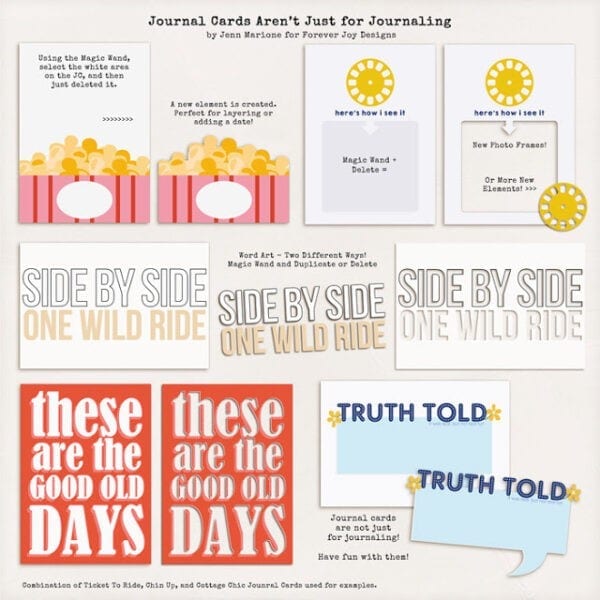
1. Make an Element – Use the Magic Wand Tool to take out parts of the card, like the popcorn below. I removed the white space, and now I have a paper popcorn piece! I also selected the little yellow film wheel and duplicated it, and created a new element.
2. Make a Frame – Use the Magic Wand Tool to take out a section that is within the borders of the journal card. Perfect for the yellow film wheel card that says “here’s how I see it!” Instant frame!
3. Make Word Art – Use the Magic Wand Tool on the words themselves and duplicate and you will create your own word art. Use it on the surrounding parts of the journal cards, and you’ve created word art cut outs! Pretty cool – just look at the Side by Side or These Are journal cards!
4. Talk Bubbles – Use the magic tool, select the talk bubble, inverse the selection, and then delete the surrounding part of the journal card. Then you have a new talk bubble! Perfect for the Truth Told card.
The Magic Wand Tool is very useful when changing up your journal cards! Remember to select all the spots that you want to remove or change. If you done, you can re-do or step back and do it again!
Here is a little graphic that I put together to show you quickly how you can totally change up journal cards to fit your scrapping needs.
Remember, you might see journal cards because that is how they are presented to you. Look at the details, can you take them a step further and make more out of them! I bet you can!
Hoping you now have a new way to stretch your stash!
Thanks for visiting!
Jenn Marione | jk703
Related



Glad you liked the tips! It’s always fun learning new ones!
Thanks for sharing this tip! I’m very new to digital scrapbooking and these are all things that I would do with paper scrapbooking, but need to practice doing digitally. I digital pocket scrap AND traditional scrap digitally, so for me it’s about getting more comfortable using the magic wand. Thanks for the great ideas!